Security
Security is ongoing work for us. This page describes the protections built into Uniwire and what we recommend on your side. They're designed to limit the effect of a single mistake, a stolen key or a stolen login. Some apply to every account, and others are yours to switch on.


Keep only what you need on the platform
No online platform is as safe as offline storage, and even hardware wallets have had their own problems, such as supply chain attacks. So our first advice to every client is simple: keep on Uniwire only the funds your daily operations need.
Automatic payouts do this for you. Set the amount to keep in each wallet, and Uniwire sends anything above it to an address you choose, such as your cold storage.
The less a wallet holds, the less any incident can cost, whatever its cause.
How keys are held
-
MPC wallets
Uniwire uses multi-party computation (MPC), an industry standard for protecting digital assets. With MPC, a transaction is signed without a complete private key ever existing in one place. -
Independent audits
Two independent security firms audited our code in 2025: Kudelski Security reviewed our MPC signing, and Zokyo reviewed our smart contracts. About the Kudelski audit Zokyo audit report -
Bitcoin multisig vaults
For Bitcoin, you can use a native multisig vault. Payouts from a vault are signed on your own Trezor devices, one or several, and Uniwire co-signs. We set up vaults on request.
Many large losses in crypto started with one compromised key. When signing is split, or part of it stays on your own devices, one key isn't enough to move funds.
Sensitive changes wait for approval
A change that can move funds or widen access doesn't apply immediately. It waits until the account owners approve it. Approval policies are on by default for every account.
- A new user, or more permissions for an existing one
- A new API key, or more permissions for an existing one
- A new automatic payout
- A higher payout limit
You see who asked for the change and exactly what it changes. You can require several approvers, and every approval asks for a two-factor code. Changes that reduce risk, like deactivating a key, apply immediately.
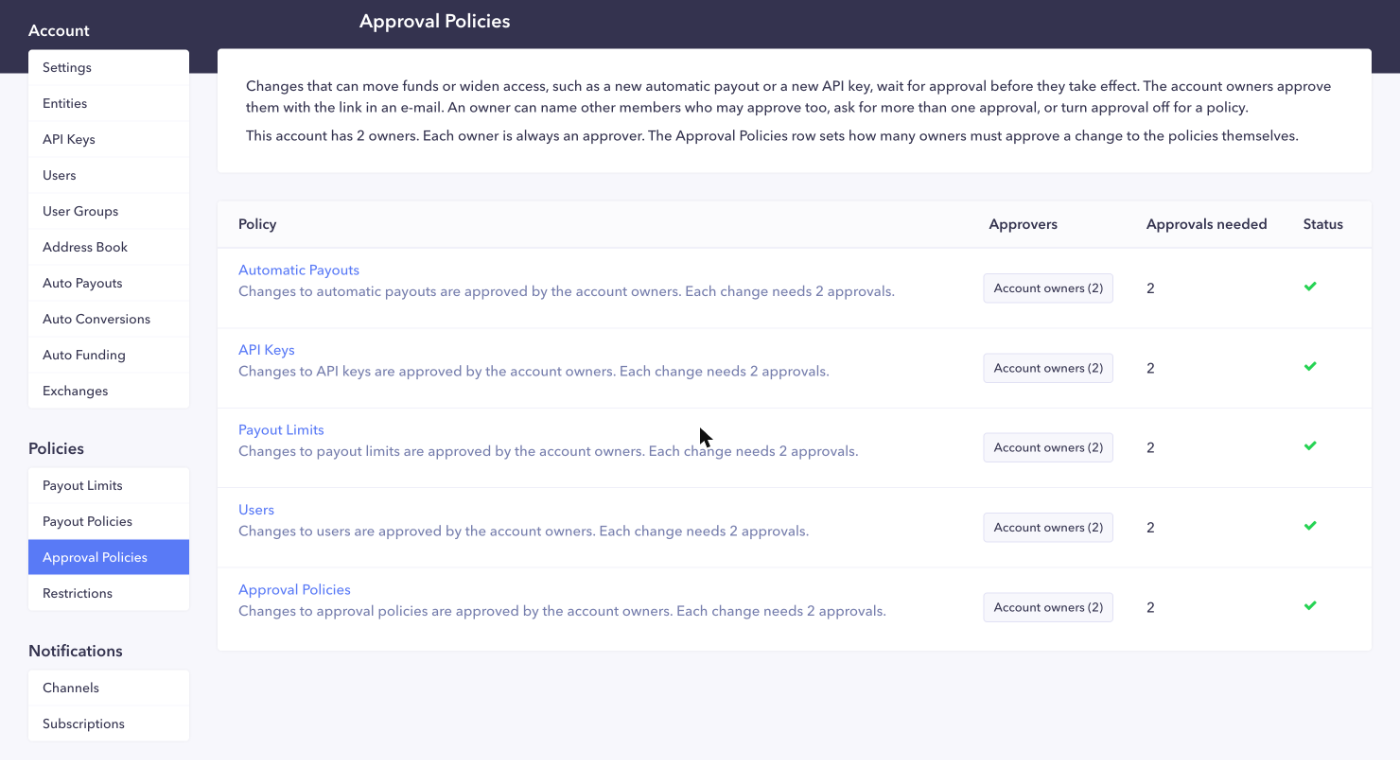
In many incidents across the industry, the attacker didn't break the platform. They used a stolen session or key to add their own access. An approval step puts that change in front of the account owners first.
Limits on what can leave
You choose the values, and Uniwire can suggest them from your payout history.
-
Payout limits
Set a daily and weekly maximum for the whole account, and separately for manual and API payouts. -
Cancel window
A manual payout waits a short time before it's sent, so you can catch a wrong address or amount. -
Payout policies
Require extra approvals for large payouts, and restrict payouts to the addresses in your address book. -
Per-key maximum
Cap the amount a single API payout can send.
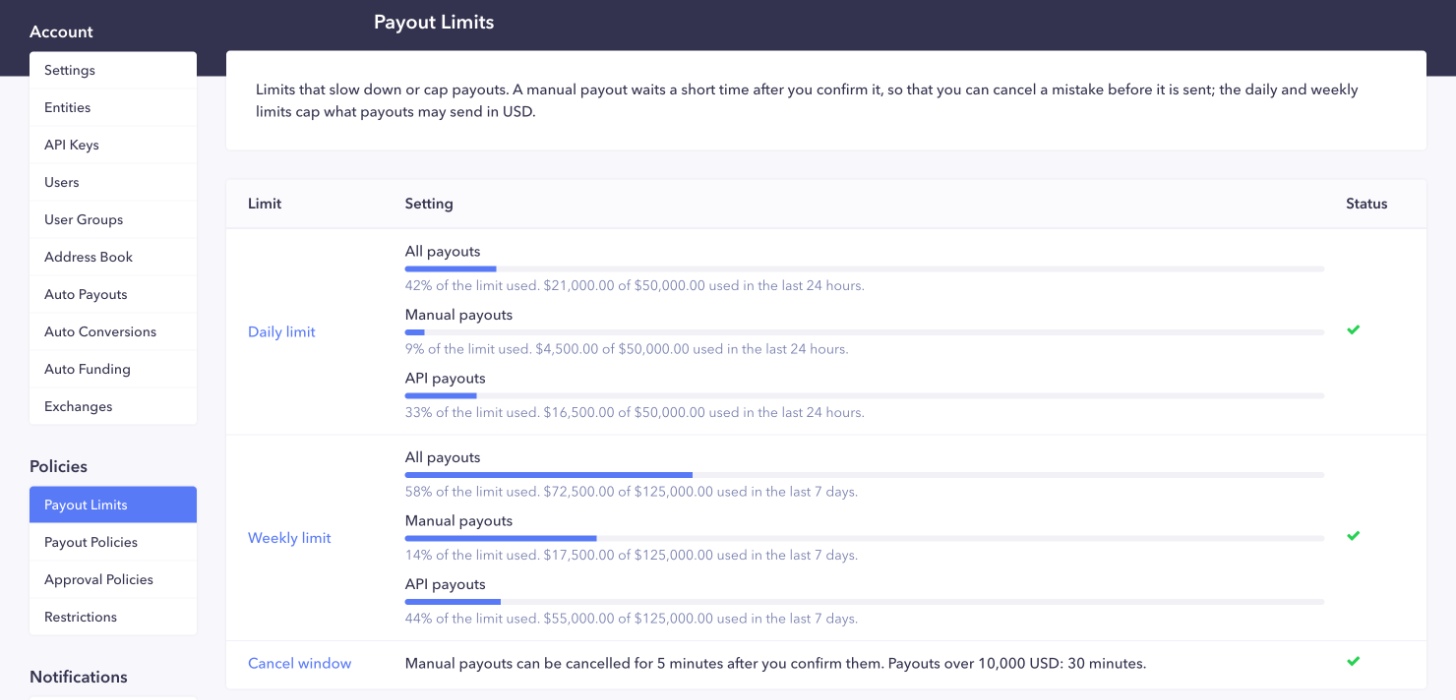
A limit can't prevent a stolen key or a bug in your integration. It caps what either one can move, and holds the rest for you to review.
Access only from where you work
-
IP allowlists
Restrict dashboard sign-ins and each API key to the IP addresses you trust. -
Least-privilege API keys
Give each key only the permissions your integration uses. We point out the ones it doesn't. -
Signed requests and callbacks
Every API request is signed, and every callback we send carries a signature you can verify.
A stolen password or key is far less useful when it works only from your own network and can do only one job.
Sign-in protection
These apply to every account, with nothing to set up.
- Two-factor authentication is required for every user.
- Sensitive actions, like payouts and API key changes, ask for a code again.
- By default, a new device must be confirmed by email before it can sign in.
- A session that turns up somewhere unexpected is ended.
Passwords get phished and reused. With these layers, a stolen password alone isn't enough to sign in.
Monitoring and alerts
These run for every account.
-
Unusual activity detection
We watch users and API keys for behavior that doesn't fit, and flag what we find. -
Security Center
One page in your account shows what needs attention, ranked by severity, with a link to fix each item. -
Security notifications
You hear about new devices, password and two-factor changes, and pending approvals. You can also subscribe to a notice when payouts near or reach a limit. -
Transaction risk screening
Incoming transactions on supported networks get a risk score, and the riskiest are quarantined for review.
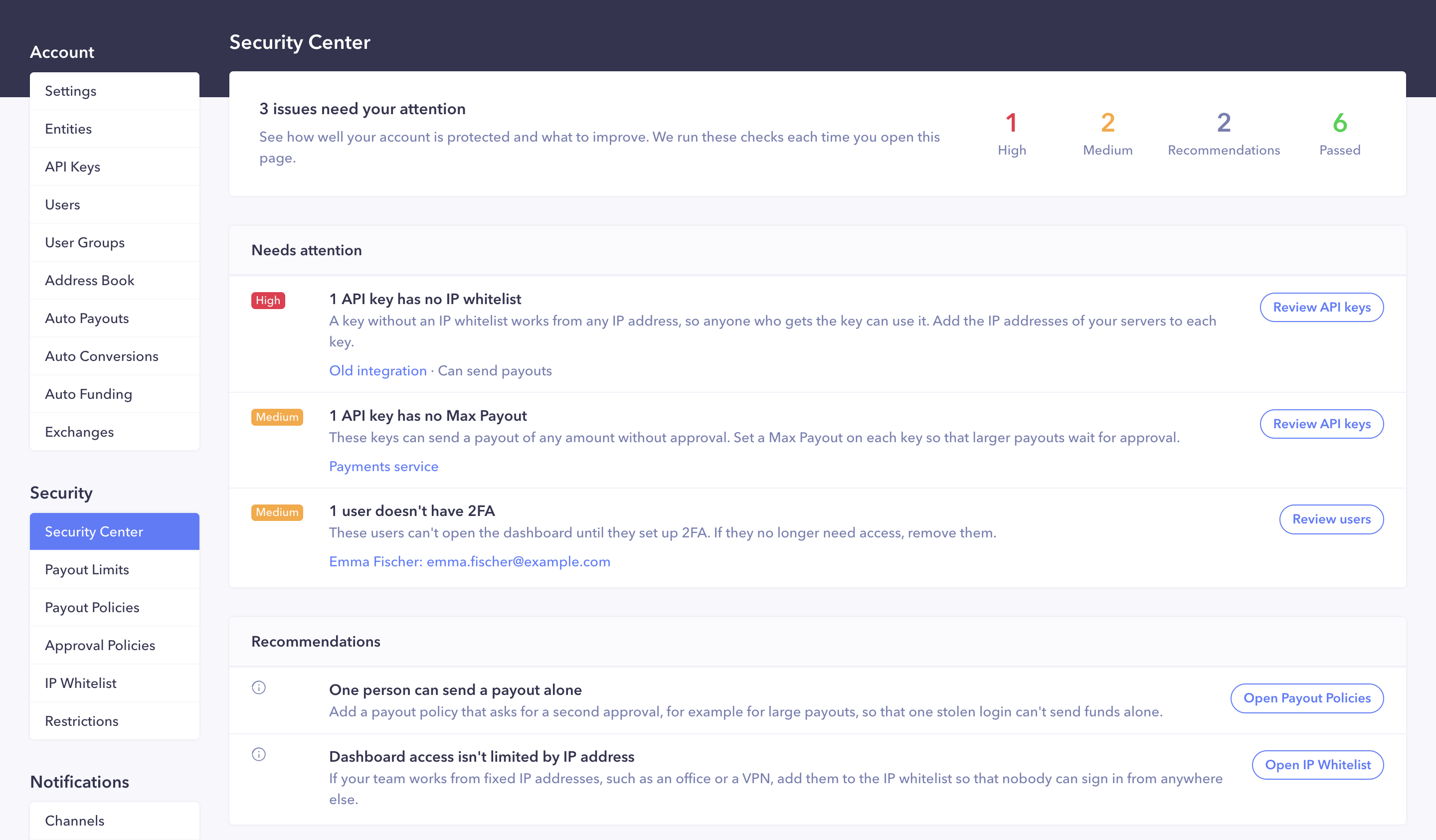
Most accounts are set up once and rarely reviewed. Regular checks help a forgotten login or an over-powered key get noticed.
How we build and ship
-
Reviews before release
Our engineers and two independent AI models review every new feature before release. -
Automated tests
Thousands of automated tests cover the platform's payment and security logic. -
Dependency checks
We regularly scan the third-party code we depend on for known vulnerabilities.
New features are where new weaknesses tend to appear. Several independent reviews lower the chance that one slips through.
What we recommend you do
- Keep only operating funds on the platform, and send the rest to your own storage automatically.
- Set payout limits and a cancel window.
- Restrict the dashboard and every API key to your IP addresses.
- Give each API key only the permissions it needs.
- Open the Security Center regularly and fix what it lists.
Questions about security?
We keep adding protections and write about them on our blog. If you have a question about your setup, contact us.
Last updated: November 2026